Microsoft Intune Suite and Security Copilot integrated in Microsoft E3 and E5
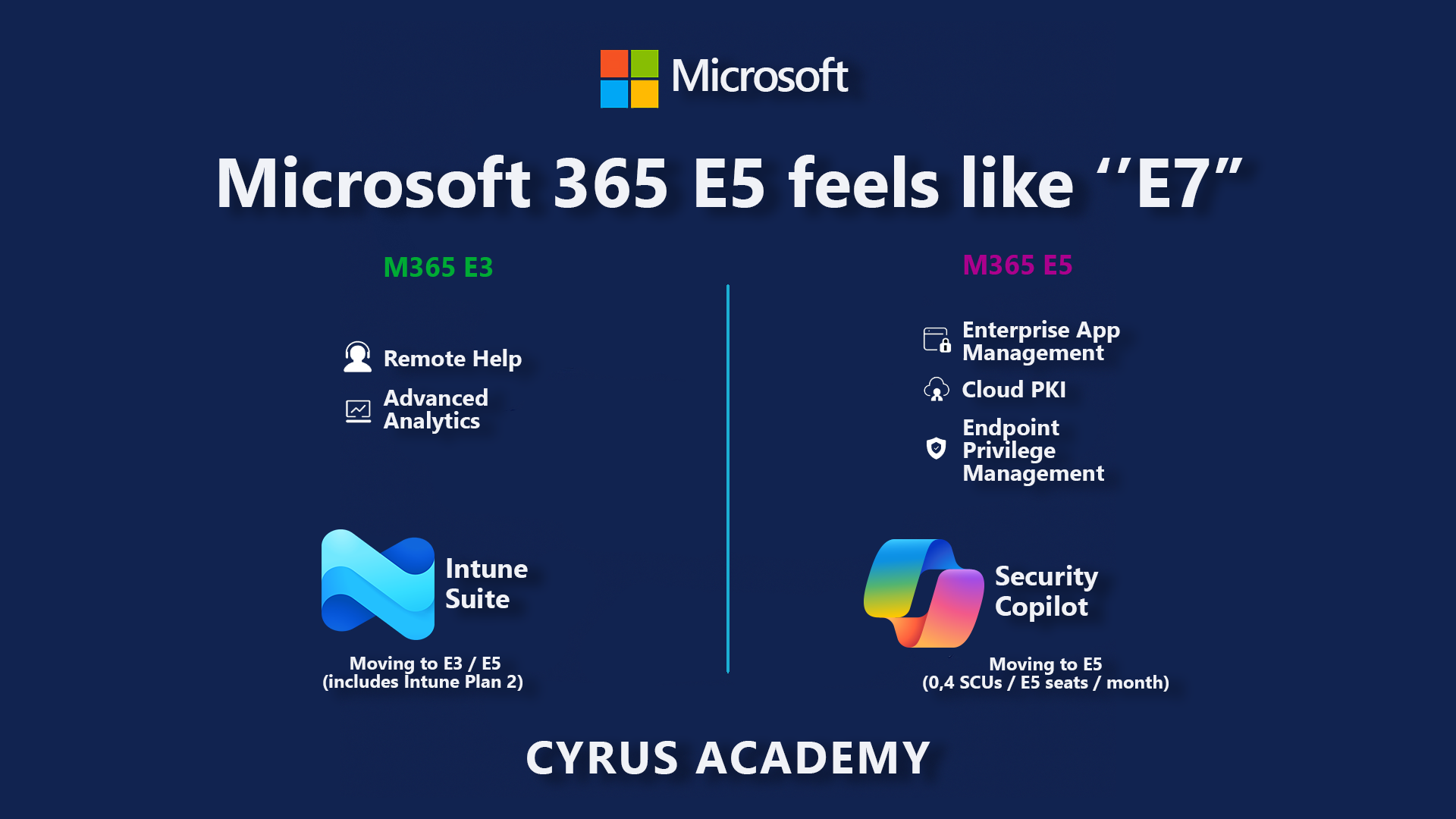
Why Microsoft 365 E5 Finally Feels Like the “E7” License
I’ve spent years complaining that Microsoft’s licensing left security and endpoint teams half-equipped. I was one of the people saying “we need a Microsoft 365 E7” to bundle all the serious security and device-management capabilities instead of scattering them across add-ons.
With the December 4th announcement — “Advancing Microsoft 365: New capabilities and pricing update” — plus the earlier inclusion of Security Copilot into Microsoft 365 E5, I finally feel like E5 is becoming that “E7-level” SKU I’ve been asking for.
Advancing Microsoft 365: New capabilities and pricing update
In this post I’ll summarise what’s changing for Microsoft 365 E3 and E5, how Intune Suite is being integrated, how Security Copilot is now included in E5 at 0.4 Security Compute Units (SCU) per user/month, and why I think E5 will be very hard to ignore by July 2026.
But first, if you haven’t already, follow our podcast, and watch this episode where we talk briefly about Security Copilot:
TL;DR
If you only read one section, make it this one:
- Intune Suite moves into M365 E3 and E5 in 2026.
- E3 picks up Remote Help, Advanced Analytics, and Intune Plan 2 (Tunnel for MAM, specialty devices, firmware-over-the-air, etc.).
- E5 adds Endpoint Privilege Management, Enterprise App Management, and Cloud PKI.
Microsoft 365 adds advanced Microsoft Intune solutions at scale
- Security Copilot is now included in Microsoft 365 E5 (including E5 Security):
- Every E5 licence gets 0.4 SCU per user/month — 400 SCUs per 1,000 users, up to 10,000 SCUs per tenant.
Learn about Security Copilot inclusion in Microsoft 365 E5
- Every E5 licence gets 0.4 SCU per user/month — 400 SCUs per 1,000 users, up to 10,000 SCUs per tenant.
- Email and collaboration security is boosted:
- Microsoft Defender for Office 365 Plan 1 is added to Office 365 E3 and Microsoft 365 E3.
- URL checks for Outlook and Office apps come to Office 365 E1, Business Basic, and Business Standard.
Windows Enterprise E3 (included in M365 E3) gains resiliency and security features like Quick Machine Recovery, cloud rebuild for Windows 11, point-in-time desktop restore, post-quantum security APIs, and Autopatch readiness.
- From 1 July 2026, list prices go up:
- Business Basic → around $7 user/month
- Business Standard → around $14 user/month
- Microsoft 365 E3 → $39 user/month
- Microsoft 365 E5 → $60 user/month
(Commercial SKUs including Teams, with local adjustments.)
Net effect: E3 becomes a stronger security baseline, and E5 finally feels like the “E7” licence we kept wishing existed.
Context: December 2025 announcements
Microsoft’s blog frames this as extending AI, security, and management capabilities “to help organisations stay productive, protected, and prepared for what’s next,” with over 430 million Microsoft 365 users and 90% of Fortune 500 already on Microsoft 365 Copilot. The new capabilities roll out across Business, Office 365, and Enterprise suites during 2026, with price changes landing on 1 July 2026.
The part that matters most for security and endpoint teams is:
- Intune Suite features baked into E3 and E5.
- Security Copilot included with E5, using an SCU model.
- Better email/URL protection across more plans.
- Windows resiliency and post-quantum security included in Windows Enterprise E3.
Let’s look at E3 and E5 in more detail.
Microsoft 365 E3 – 2025 vs 2026
For many organisations, E3 is the default enterprise baseline. Until now you needed extra add-ons (Intune Suite, MDO P1, etc.) to get serious endpoint and email protection. That’s what starts to change.
What E3 gives you today
Right now, Microsoft 365 E3 already includes:
- Core Microsoft 365 apps (Office, Teams, SharePoint, OneDrive)
- Entra ID P1 (conditional access, basic identity protection)
- Defender for Endpoint P1 and other baseline security capabilities
- Standard Intune device management for PCs and mobiles
- Windows Enterprise E3 (without the new resiliency extras)
You can add Intune Suite capabilities today (Remote Help, Advanced Analytics, Tunnel for MAM, etc.), but they’re separate line items.
What E3 will include by July 2026
The December announcement folds several of those “nice to have but extra” capabilities into the core entitlement for E3 (directly or via EMS E3 and Windows Enterprise E3):
Email & collaboration protection
- Defender for Office 365 Plan 1 included with Office 365 E3 and Microsoft 365 E3, giving better protection against phishing, malware, and malicious links across email and Teams.
- URL checks in Outlook and Office apps to block known-bad sites when users click on links.
Integrated endpoint management (via EMS E3 / Intune)
- Intune Remote Help – secure, audited, enterprise-grade remote support.
- Intune Advanced Analytics – AI-powered anomaly detection and insights into device health, compliance, and digital friction.
- Intune Plan 2, which includes:
- Microsoft Tunnel for Mobile Application Management (per-app VPN without enrollment)
- Specialty device management (HoloLens, Teams Rooms, kiosks, etc.)
- Firmware-over-the-air updates for supported devices.
Windows Enterprise E3 resiliency & security
- Quick Machine Recovery (QMR) – fast recovery path for broken devices.
- Cloud rebuild for Windows 11 – rebuild devices from a trusted cloud image.
- Point-in-time restore for desktop – roll endpoints back to known-good states.
- Post-quantum security APIs and Autopatch update readiness.
These features are already available today as add-ons or as part of Intune Suite; the difference from 2026 is that they become included in the E3-level suites.
Microsoft 365 E5 – why it finally feels like “E7”
E5 has always been the “everything” SKU: advanced security, compliance, analytics, and so on. But you still needed to bolt on Intune Suite and Security Copilot separately. That’s what changes the most.
Security Copilot included – 0.4 SCU per user/month
Microsoft is now including Security Copilot with every Microsoft 365 E5 tenant (including E5 Security), using a pooled Security Compute Unit (SCU) model:
- Each M365 E5 licence includes 0.4 SCU per month.
- That’s 400 SCUs for every 1,000 users, up to 10,000 SCUs per tenant/month at no extra cost.
- The SCU pool is shared across your tenant and resets monthly (no roll-over).
For many organisations, this will be enough to run:
- Day-to-day incident investigation and response
- Threat hunting across Defender, Entra, Intune, and Purview
- Automation through agents for repetitive SOC workflows
If you go beyond the included SCUs, you’ll be able to buy additional capacity on a pay-as-you-go basis (around $6 per SCU), but crucially the baseline entitlement is now bundled into E5.
Security Copilot inclusion FAQ
Intune Suite: advanced endpoint security built into E5
On top of everything E3 gets, Microsoft 365 E5 picks up the “heavyweight” Intune Suite capabilities:
- Intune Endpoint Privilege Management (EPM)
- Enforces least privilege on endpoints with just-in-time elevations for approved apps.
- Cuts the risk of giving local admin rights to everyone.
- Intune Enterprise App Management (EAM)
- Streamlines application lifecycle (packaging, updating, retiring) at scale.
- Reduces unpatched software and “shadow IT” installers.
- Microsoft Cloud PKI
- Cloud-hosted certificate authority for devices, users, and apps.
- Simplifies certificate lifecycles and strengthens Zero Trust scenarios such as certificate-based Wi-Fi/VPN and device authentication.
These are exactly the kinds of features I used to group mentally into a hypothetical “E7” licence. They’re now core to E5 instead of being purely add-on territory.
Side-by-side: E3 vs E5 after the changes
Here’s a high-level view focused on security and endpoint management.
New inclusions by 2026
| Suite | New inclusions (previously separate add-ons) |
|---|---|
| Microsoft 365 E3 | Defender for Office 365 Plan 1; URL checks in Outlook and Office apps; Intune Remote Help; Intune Advanced Analytics; Intune Plan 2 (Tunnel for MAM, specialty devices, firmware updates); Windows Enterprise E3 resiliency features (Quick Machine Recovery, cloud rebuild for Windows 11, point-in-time desktop restore, post-quantum security APIs, Autopatch readiness). |
| Microsoft 365 E5 | Everything in E3, plus Intune Endpoint Privilege Management, Intune Enterprise App Management, Microsoft Cloud PKI, and Security Copilot entitlement (400 SCUs per 1,000 users/month, up to 10,000 SCUs). |
What’s available today vs 2026
- Today (late 2025)
- You can already buy Intune Suite and Security Copilot as add-ons to E3/E5.
- If you’re on E5 and already have Security Copilot, the included SCU entitlement is active now.
- Other E5 tenants will see Security Copilot roll out over the coming months with 30-day notifications.
- Throughout 2026, leading up to July
- The Intune Suite capabilities move into the suites: EMS E3/M365 E3 and M365 E5.
- Defender for Office 365 P1 and URL checks light up in the respective plans.
- Windows Enterprise E3 gains the new resiliency features.
- From 1 July 2026 onwards
- New list prices apply for commercial and government suites (with regional adjustments).
- Nonprofit pricing follows the same pattern, tied to commercial rates via fixed discounts.
What about the Business plans?
The Microsoft blog also describes updates for Business Basic, Business Standard, and Business Premium, plus Office 365 E1:
- URL checks in Outlook and Office apps come to Business Basic, Business Standard, and Office 365 E1.
- Copilot Chat enhancements and security/management analytics for Copilot are spread across the Business line-up.
- Some Business plans also gain +50 GB mailbox storage and other productivity upgrades.
If you’re managing SMB environments, the takeaway is that safer email and smarter AI governance become available without jumping straight to Enterprise SKUs.
Pricing vs value: does it justify the increase?
From 1 July 2026, Microsoft will raise list prices for commercial Microsoft 365 suites. According to Microsoft and multiple reporting sources:
- Business Basic increases by roughly 16.7% to about $7 user/month.
- Business Standard increases by around 12% to about $14 user/month.
- Microsoft 365 E3 increases by 8.3% to about $39 user/month.
- Microsoft 365 E5 increases by 5.3% to about $60 user/month.
This is Microsoft’s first major commercial price change since 2022 and comes on top of the separate Copilot licence announcements earlier in the year. Microsoft’s argument is that they’ve shipped over 1,100 new features across Microsoft 365, Security, Copilot, and SharePoint in the last year alone and are now folding previously premium add-ons into the core suites.
You can debate the pricing, but for once the added value is very concrete — especially if you were considering Intune Suite or Security Copilot anyway.
Why this is a big deal for security and device teams
From a security and endpoint management perspective, this feels like a pre-Christmas gift:
- Security Copilot included in E5 means more organisations can realistically start using AI-driven investigation, threat hunting, and agentic automation without arguing for a separate budget line.
- Intune Suite capabilities in E3 and E5 mean you can standardise on Microsoft 365 suites instead of juggling separate Intune SKUs for Remote Help, EPM, Cloud PKI, etc.
- Windows resiliency features move “disaster recovery for laptops” closer to a built-in platform capability rather than a custom project.
If you’re running a SOC or an endpoint team, this announcement gives you a strong argument that E3 is the new baseline and E5 is the operational sweet-spot.
How I’m advising customers
Here’s how I’m thinking about it in real customer conversations:
- Treat Microsoft 365 E3 as the secure baseline.
- Use it for most information workers.
- Take advantage of the included Intune and Windows features to modernise device management and recovery.
- Use Microsoft 365 E5 strategically.
- Default for SOC analysts, security engineers, and identity/device/platform teams that will live inside Security Copilot and Intune every day.
- Default for high-risk units (executives, finance, privileged admins, OT bridge teams, etc.).
- Plan the 2026 transition now.
- Map where you already pay for Intune Suite add-ons and how those costs change when they become included.
- Estimate SCU consumption for your planned Security Copilot scenarios so you understand whether the included 0.4 SCU per user will be enough.
- Use the long runway to re-shape your licensing mix instead of just swallowing a price rise.
- Stay critical, but acknowledge the progress.
- I’ve been very vocal that Microsoft needed an E7 licence.
- With E5 + Intune Suite + Security Copilot included, I have to admit: E5 finally feels like that “E7-level” licence.
Key takeaways
- E3 gets stronger: better email protection, integrated Intune capabilities, and Windows resiliency features.
- E5 becomes the real “all-in” security SKU: Security Copilot included, plus EPM, EAM, and Cloud PKI.
- Prices rise in July 2026, but if you were buying these add-ons already, the net value can be positive — especially once you factor in SOC efficiency and reduced third-party tooling.
If you’re responsible for security, identity, or endpoint management, now is exactly the right time to:
- Re-evaluate your E3 vs E5 mix.
- Start piloting Security Copilot with the teams who will benefit the most.
- Build a roadmap to modernise endpoint management with Intune while the new capabilities are still in preview/rollout phase.
References & further reading
- Advancing Microsoft 365: New capabilities and pricing update
- Microsoft 365 adds advanced Microsoft Intune solutions at scale
- Learn about Security Copilot inclusion in Microsoft 365 E5
- Security Copilot in Microsoft 365 E5 overview
- Reuters: Microsoft to lift productivity suite prices for businesses, governments (Dec 4, 2025)